
Application brief
Context and intent
Build a backend-for-frontend (BFF) for a product-discovery client. The client needs a stable, client-oriented API, while product data is owned by the existing Order API and successful product queries must also be reported asynchronously for auditing.
The BFF is the system boundary that shields the client from those downstream integrations. It does not own product data. Instead, it:
- exposes the client-facing HTTP interface described below;
- translates and forwards product reads and writes to the Order API;
- validates both client requests and downstream responses at the boundary;
- converts downstream unavailability into the documented resiliency behavior; and
- publishes a product-query event to Kafka after a successful availability search.
The purpose of this application is therefore not simply to proxy HTTP calls. It must preserve the BFF contract even when the Order API is slow, unavailable, or returns data that violates the requested business constraints. This behavior must be verifiable without requiring live Order API or Kafka infrastructure.
Solution architecture
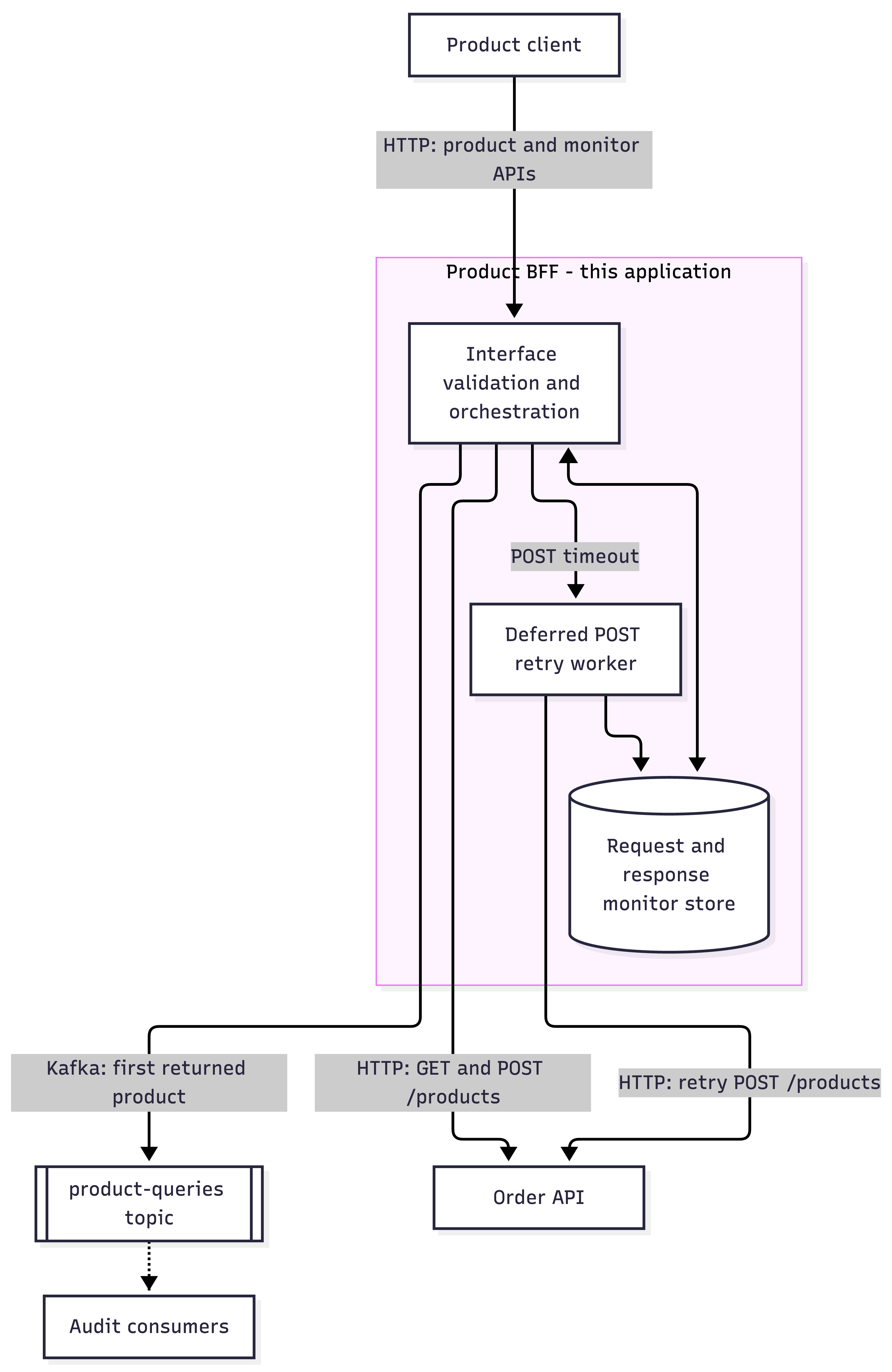
Figure 1: Product BFF orchestration
Responsibilities and boundaries
| Component | Responsibility |
|---|---|
| Product client | Calls the client-oriented product and monitor endpoints |
| Product BFF | Validates, orchestrates, applies resiliency policy, records deferred requests, and publishes query events |
| Order API | System of record for product reads and writes |
Kafka product-queries topic | Carries the first product returned by a successful availability query |
| Downstream consumers | Consume product-query events; their implementation is outside this application’s scope |
The monitor store and retry worker are internal BFF implementation concerns. The Order API and Kafka broker are external dependencies and must be replaceable with test doubles through configuration. Implementing the Order API, Kafka consumers, or a product database is out of scope.
Technology and delivery constraints
- Implement a runnable Java application using Spring Boot and Maven.
- Make the downstream Order API base URL configurable.
- Make the Kafka bootstrap servers configurable.
- Include a good
README.mdcovering how to build, test, configure, and run the application. - Ensure the application starts successfully as a local HTTP service using the standard tooling for its technology stack.
- Expose the health endpoint below so automated tooling can determine when the HTTP application is ready without invoking business operations.
Client-facing HTTP interface
By default, the application listens on port 8080 and implements exactly the four operations below. Enforce the stated
parameter, header, body, media-type, and response constraints. Do not add operations or response statuses not listed
here.
GET /health - application readiness
Return 200 application/json once the HTTP application is initialized and ready to accept requests. The response body
must be exactly:
{
  “status”: “UP”
}
This is a shallow application-readiness check. It must not call the Order API or Kafka, inspect or mutate monitor state, publish messages, or perform other business side effects. Dependency readiness is managed separately by the runtime and test harness.
POST /products - create a product
Accept a required Content-Type: application/json request body matching ProductBase.
Example request:
```http POST /products HTTP/1.1 Content-Type: application/json
{ “name”: “iPhone”, “type”: “gadget”, “inventory”: 100 } ```
Allowed responses:
| Status | When | Response |
|---|---|---|
201 Created | The Order API creates the product | application/json body containing required integer field id, for example {”id”:1} |
202 Accepted | The downstream POST times out | Required Link response header and no response body |
400 Bad Request | The client request is invalid | application/json error object |
The Link header must match this exact structure, with a numeric monitor ID and an alphanumeric, space, underscore, or
hyphen title:
Link: </monitor/123>;rel=related;title=monitor
GET /monitor/{id} - retrieve a deferred request
id is a required integer path parameter.
Allowed responses:
| Status | When | Response |
|---|---|---|
200 OK | The monitor can be returned | application/json monitor object described below |
400 Bad Request | The path parameter or request is invalid | application/json error object |
404 Not Found | A valid monitor ID is not present | application/json error object |
A monitor object has the following fields:
| Field | Type | Required | Constraints |
|---|---|---|---|
request | object | no | when present, must match the recorded-request shape below |
response | object | no | when present, must match the recorded-response shape below |
A recorded request has the following fields:
| Field | Type | Required | Constraints |
|---|---|---|---|
method | string | yes | none |
body | object | yes | contains the original request body |
headers | array of header objects | yes | each item uses the header-item shape below |
A recorded response has the following fields:
| Field | Type | Required | Constraints |
|---|---|---|---|
statusCode | integer | yes | none |
body | object | yes | contains the downstream response body |
headers | array of header objects | yes | each item uses the header-item shape below |
A header item has the following fields:
| Field | Type | Required | Constraints |
|---|---|---|---|
name | string | no | none |
value | string | no | none |
Completed-monitor example:
{
“request”: {
“method”: “POST”,
“body”: {
“name”: “iPhone”,
“type”: “gadget”,
“inventory”: 100
},
“headers”: []
},
“response”: {
“statusCode”: 201,
“body”: {
“id”: 1
},
“headers”: []
}
}
Before the retry completes, return the recorded request and omit the unavailable response. Once the retry succeeds, retain the response so subsequent monitor calls return both objects.
GET /findAvailableProducts - find available products
Request inputs:
| Name | Location | Type | Required | Constraints |
|---|---|---|---|---|
type | query | string | no | one of book, food, gadget, or other |
pageSize | header | integer | yes | none |
from-date | query | string | yes | YYYY-MM-DD date format |
to-date | query | string | yes | YYYY-MM-DD date format |
Example request:
GET /findAvailableProducts?type=gadget&from-date=2025-01-01&to-date=2025-11-28 HTTP/1.1 pageSize: 10
Allowed responses:
| Status | When | Response |
|---|---|---|
200 OK | The Order API returns a valid result | application/json array of Product objects; the array may be empty |
429 Too Many Requests | The downstream GET times out | Required integer Retry-After response header, set to 1, and no response body |
400 Bad Request | The client request is invalid | application/json error object |
502 Bad Gateway | The downstream response violates the requested filters | application/json error object |
503 Service Unavailable | The Order API is unreachable, or Kafka publication fails or times out | application/json error object |
Example successful response:
[
{
  “id”: 1,
  “name”: “iPhone”,
  “type”: “gadget”,
  “inventory”: 100,
  “createdOn”: “2025-01-01”
}
]
Downstream Order API interface
Do not use an in-memory product store. Use these Order API operations over HTTP. Forward the product filters and page-size header received from the client when calling the downstream GET.
Downstream GET /products
The downstream endpoint accepts the same optional type query parameter, optional pageSize integer header, and
optional from-date and to-date date query parameters described above. A successful response is
200 application/json with an array of Product objects. A bad request is 400 application/json with the error shape
described above.
Example interaction:
GET /products?type=gadget&from-date=2025-01-01&to-date=2025-11-28 HTTP/1.1 pageSize: 10
```http HTTP/1.1 200 OK Content-Type: application/json
[ { “id”: 1, “name”: “iPhone”, “type”: “gadget”, “inventory”: 100, “createdOn”: “2025-01-01” } ] ```
Downstream POST /products
Send an application/jsonProductBase body. The downstream call requires:
- a non-empty
AuthenticateAPI-key header; and - an
Idempotency-Keyheader containing a UUID so retries do not create duplicates.
On success, it returns 201 application/json with an object containing required integer field id. It can also return
400 Bad Request, 415 Unsupported Media Type, or 422 Unprocessable Entity, each with an application/json error
body.
Example interaction:
```http POST /products HTTP/1.1 Content-Type: application/json Authenticate: configured-api-key Idempotency-Key: 3d593d8d-6141-4c13-aad1-d0bc2f20ca42
{ “name”: “iPhone”, “type”: “gadget”, “inventory”: 100 } ```
```http HTTP/1.1 201 Created Content-Type: application/json
{ “id”: 1 } ```
Kafka message interface
For every non-empty successful GET /findAvailableProducts result, publish exactly one message with a body and no
headers for the first returned product to the Kafka topic product-queries. Wait for the Kafka broker to acknowledge
the publication before completing the 200 OK response; do not leave publication as unobserved background work.
Bound the wait for Kafka acknowledgement to one second. If publication fails or acknowledgement is not received within
that period, return the documented 503 Service Unavailable error response instead of 200 OK.
The message content type is application/json. Its supported fields are:
| Field | Type | Required | Constraints |
|---|---|---|---|
name | string | no | none |
inventory | integer | yes | none |
id | integer | yes | none |
categories | array of category objects | no | each item uses the category shape below |
A category object has the following fields:
| Field | Type | Required | Constraints |
|---|---|---|---|
id | integer | no | none |
name | string | no | none |
Project the matching fields from the first downstream product as the Kafka message. For example, the successful response shown above produces:
{
  “id”: 1,
  “name”: “iPhone”,
  “inventory”: 100
}
Resiliency and business behavior
Deferred POST processing
- When the downstream POST times out, return
202, record the request, and provide its monitor URL in theLinkheader. - Retry the same downstream request in a background thread pool every 1 second until it succeeds or 10 retries have been attempted.
- Reuse the same idempotency key for every retry of one logical product-creation request.
- When a retry succeeds, record the downstream response so the next monitor call returns the request and response.
GET throttling
- When the downstream GET times out, return
429withRetry-After: 1, and enforce the one-second retry interval. - When the downstream GET fails because the Order API is unreachable, including connection refusal, DNS failure, or
connection reset, return the documented
503 Service Unavailableerror response. - A later successful request follows the normal
200response and Kafka publication flow.
Downstream response validation
- When
typewas supplied, every returned product must have exactly thattype. - When
from-datewas supplied, every returned product’screatedOndate must be on or after it. - When
to-datewas supplied, every returned product’screatedOndate must be on or before it. - Return the documented
502error response if any returned product violates these conditions. Do not publish a Kafka message for an invalid downstream response.
Connectivity timeouts
- The timeout for every POST or GET request to Order API should be configurable through an environment variable named
ORDER_API_TIMEOUT_MS. If it is not provided, default to 500 milliseconds.
Tests
- Automated tests must cover the specified contracts, resiliency behavior, downstream validation, and Kafka publication rules.